useDrawerForm
useDrawerForm hook allows you to manage a form within a Drawer. It returns Ant Design Form and Drawer components props.
import { useDrawerForm } from "@pankod/refine-antd";

const { drawerProps, formProps } = useDrawerForm<IPost>({
    action: "create", // or "edit"
});
All we have to do is to pass the drawerProps to <Drawer> and formProps to <Form> components.
Usage
We'll do two examples, one for creating and one for editing a post. Let's see how useDrawerForm is used in both.
Create Drawer
import { useDrawerForm, Drawer, Form, Create, Radio, List, Input } from "@pankod/refine-antd";

export const PostList: React.FC = () => {
    const {
        formProps,
        drawerProps,
        show,
        saveButtonProps,
    } = useDrawerForm<IPost>({
        action: "create",
    });

    return (
        <>
            <List
                createButtonProps={{
                    onClick: () => {
                        show();
                    },
                }}
            >
                ...
            </List>
            <Drawer {...drawerProps}>
                <Create saveButtonProps={saveButtonProps}>
                    <Form {...formProps} layout="vertical">
                        <Form.Item label="Title" name="title">
                            <Input />
                        </Form.Item>
                        <Form.Item label="Status" name="status">
                            <Radio.Group>
                                <Radio value="draft">Draft</Radio>
                                <Radio value="published">Published</Radio>
                                <Radio value="rejected">Rejected</Radio>
                            </Radio.Group>
                        </Form.Item>
                    </Form>
                </Create>
            </Drawer>
        </>
    )
}

interface IPost {
    id: number;
    title: string;
    status: "published" | "draft" | "rejected";
}
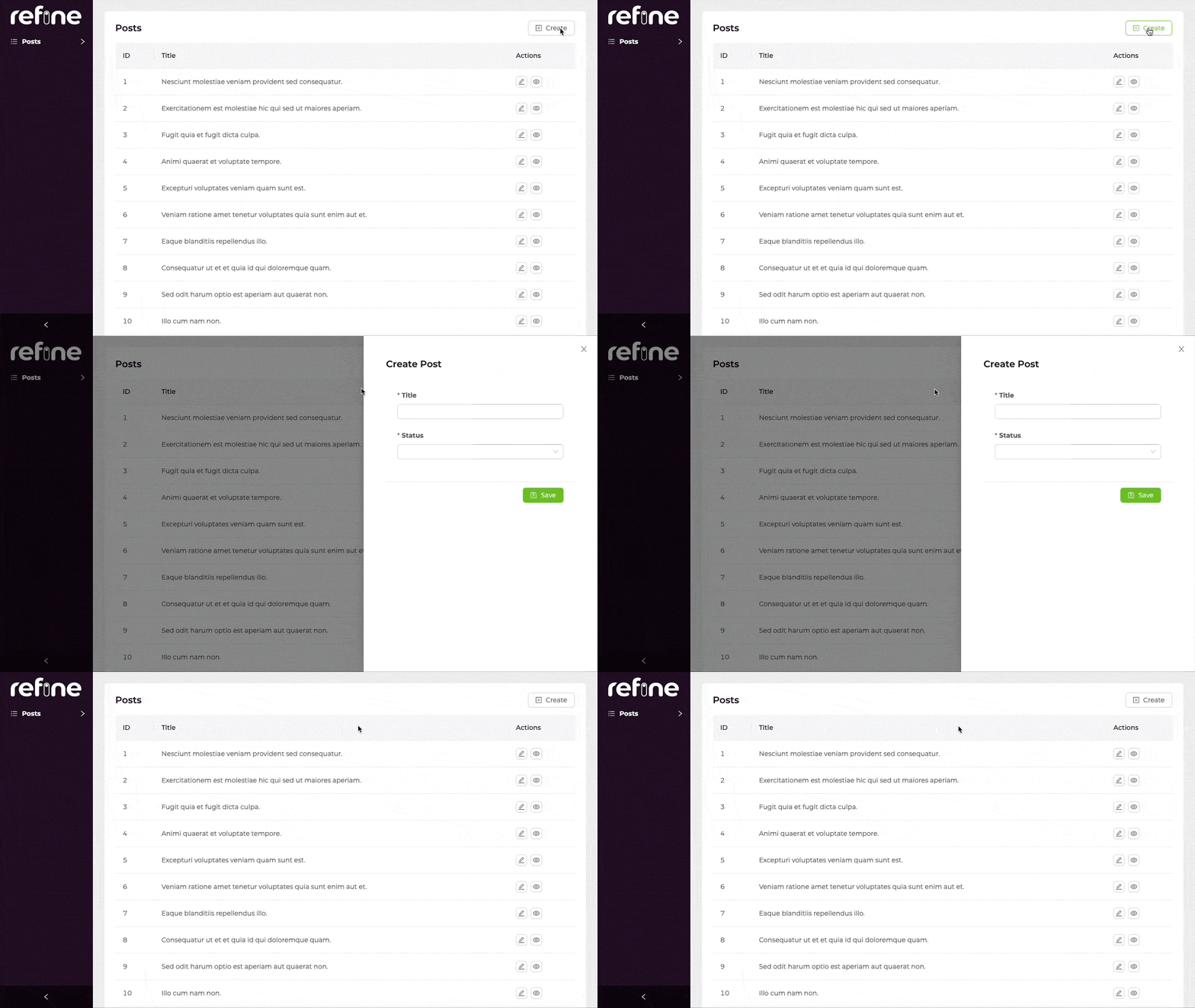
createButtonProps allows us to create and manage a button above the table.
    createButtonProps={{
        onClick: () => {
            show();
        },
    }}
This code block makes <Drawer> appear when you click the button.
saveButtonProps allows us to manage the save button in the drawer.
Edit Drawer
Let's learn how to add editing capabilities to the records that will be opening form in Drawer with using action prop.
import {
    useDrawerForm,
    Drawer,
    Form,
    Create,
    Radio,
    List,
    Edit,
    Table,
    EditButton,
    Input
} from "@pankod/refine-antd";

export const PostList: React.FC = () => {
    const {
        drawerProps,
        formProps,
        show,
        saveButtonProps,
        deleteButtonProps,
        id,
    } = useDrawerForm<IPost>({
        action: "edit",
    });

    return (
        <>
            <List>
                <Table>
                    ...
                    <Table.Column<IPost>
                        title="Actions"
                        dataIndex="actions"
                        key="actions"
                        render={(_value, record) => (
                            <EditButton
                                size="small"
                                recordItemId={record.id}
                                onClick={() => show(record.id)}
                            />
                        )}
                    />
                </Table>
            </List>
            <Drawer {...drawerProps}>
                <Edit
                    saveButtonProps={saveButtonProps}
                    deleteButtonProps={deleteButtonProps}
                    recordItemId={id}
                >
                    <Form {...formProps} layout="vertical">
                        <Form.Item label="Title" name="title">
                            <Input />
                        </Form.Item>
                        <Form.Item label="Status" name="status">
                            <Radio.Group>
                                <Radio value="draft">Draft</Radio>
                                <Radio value="published">Published</Radio>
                                <Radio value="rejected">Rejected</Radio>
                            </Radio.Group>
                        </Form.Item>
                    </Form>
                </Edit>
            </Drawer>
        </>
    )
}

interface IPost {
    id: number;
    title: string;
    status: "published" | "draft" | "rejected";
}
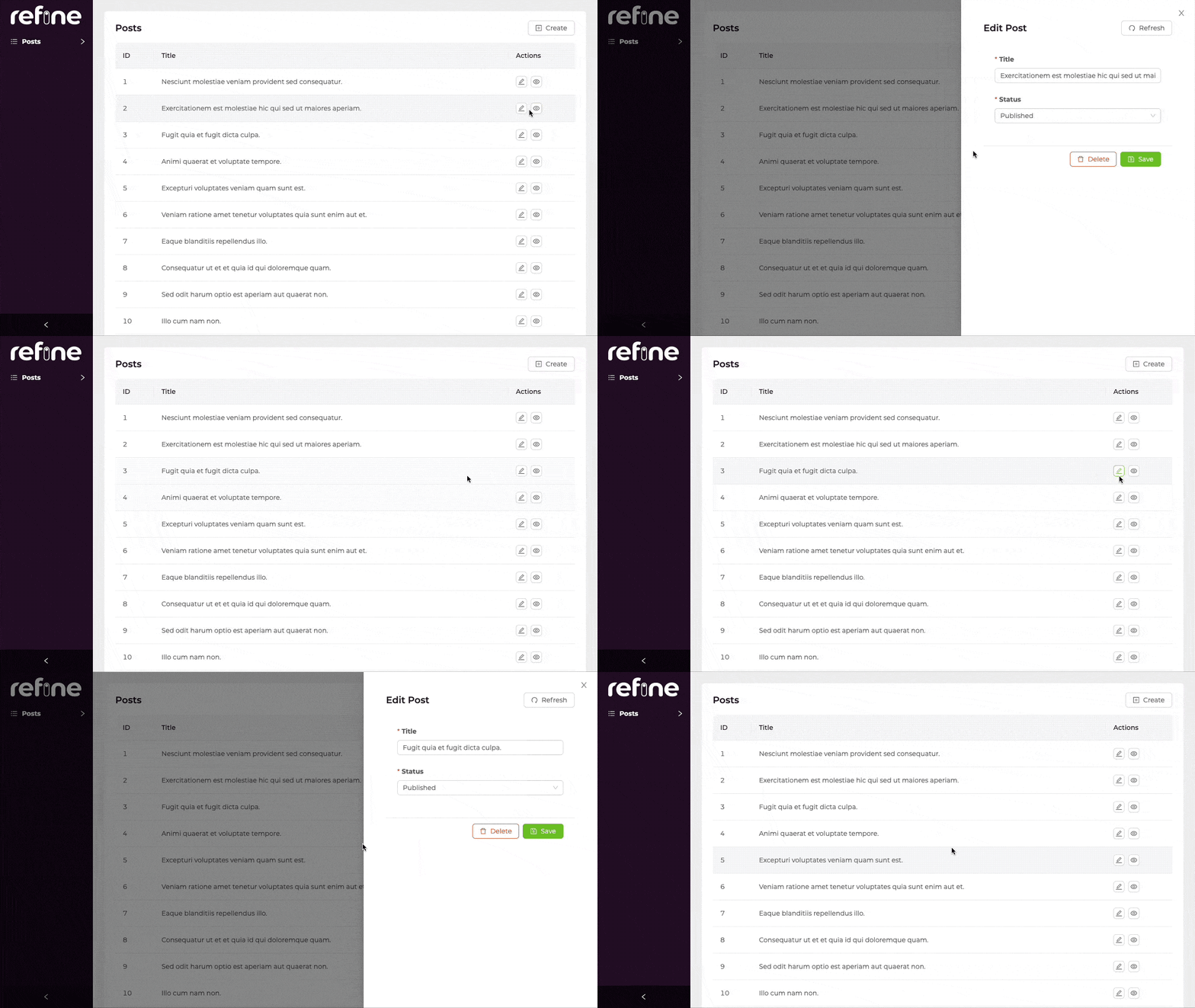
refine doesn't automatically add a edit button to the each record in <PostList> which opens edit form in <Drawer> when clicking.
So, we have to put the edit buttons on our list. In that way, <Edit> form in <Drawer> can fetch data by the record id.
<Table.Column<IPost>
    title="Actions"
    dataIndex="actions"
    key="actions"
    render={(_value, record) => (
        <EditButton
            size="small"
            recordItemId={record.id}
            onClick={() => show(record.id)}
        />
    )}
/>
The saveButtonProps and deleteButtonProps gives us the ability of saving and deleting buttons in the drawer.
API Parameters
Properties
*: These props have default values inRefineContextand can also be set on <Refine> component.useDrawerFormwill use what is passed to<Refine>as default but a local value will override it.
**: If not explicitly configured, default value ofredirectdepends whichactionused. Ifactioniscreate,redirects default value isedit(created resources edit page). Otherwise ifactionisedit,redirects default value islist.
Return Value
| Key | Description | Type |
|---|---|---|
| show | A function that opens the drawer | (id?: BaseKey) => void |
| formProps | Ant Design form props | FormProps |
| drawerProps | Props for managed drawer | DrawerProps |
| saveButtonProps | Props for a submit button | { disabled: boolean; onClick: () => void; loading: boolean; } |
| deleteButtonProps | Adds props for delete button | DeleteButtonProps |
| formLoading | Loading status of form | boolean |
| submit | Submit method, the parameter is the value of the form fields | () => void |
| visible | Whether the drawer is visible or not | boolean |
| close | Specify a function that can close the drawer | () => void |
| defaultFormValuesLoading | DefaultFormValues loading status of form | boolean |
| form | Ant Design form instance | FormInstance<TVariables> |
| id | Record id for edit action | string |
| setId | id setter | Dispatch<SetStateAction< string | undefined>> |
| queryResult | Result of the query of a record | QueryObserverResult<{ data: TData }> |
| mutationResult | Result of the mutation triggered by submitting the form | UseMutationResult<{ data: TData },TError, { resource: string; values: TVariables; }, unknown> |
Type Parameters
| Property | Desription | Default |
|---|---|---|
| TData | Result data of the query that extends BaseRecord | BaseRecord |
| TError | Custom error object that extends HttpError | HttpError |
| TVariables | Values for params. | {} |