useStepsForm
useStepsForm hook allows you to split your form under an Ant Design based Steps component and provides you with a few useful functionalities that will help you manage your form.
import { useStepsForm } from "@pankod/refine-antd";

const { stepsProps, formProps } = useStepsForm<IPost>();
All we have to do is to pass the props it returns to our <Steps> and <Form> components.
Usage
We'll do two examples, one for creating and one for editing a post. Let's see how useStepsForm is used in both.
Create
For the sake of simplicity, in this example we're going to build a Post create form that consists of only a title and a relational category field.
To split your form items under a <Steps> component, first import and use useStepsForm hook in your page:
import { useStepsForm } from "@pankod/refine-antd";

export const PostCreate: React.FC = () => {
    const {
        current,
        gotoStep,
        stepsProps,
        formProps,
        saveButtonProps,
        queryResult,
    } = useStepsForm<IPost>();

    return null;
};

interface ICategory {
    id: number;
    title: string;
}

interface IPost {
    id: number;
    title: string;
    status: "published" | "draft" | "rejected";
}
useStepsForm is generic over the type form data to help you type check your code.
This hook returns a set of useful values to render steps form. Given current value, you should have a way to render your form items conditionally with this index value. You can use an array to achieve this.
Here, each item of formList corresponds to one step in form:
import { useStepsForm, useSelect, Form, Input, Select } from "@pankod/refine-antd";

export const PostCreate: React.FC = () => {
    const {
        current,
        gotoStep,
        stepsProps,
        formProps,
        saveButtonProps,
    } = useStepsForm<IPost>();

    const { selectProps: categorySelectProps } = useSelect<ICategory>({
        resource: "categories",
    });

    const formList = [
        <>
            <Form.Item
                label="Title"
                name="title"
                rules={[
                    {
                        required: true,
                    },
                ]}
            >
                <Input />
            </Form.Item>
        </>,
        <>
            <Form.Item
                label="Category"
                name={["category", "id"]}
                rules={[
                    {
                        required: true,
                    },
                ]}
            >
                <Select {...categorySelectProps} />
            </Form.Item>
        </>,
    ];

    return null;
};
Since category is a relational data, we use useSelect to fetch its data.
You should use stepsProps on <Steps> component, formProps on the <Form> component respectively. And as the last step, you should render the <Steps> component besides the form like this:
import {
    useStepsForm,
    useSelect,
    Form,
    Input,
    Select,
    Create,
    Steps,
} from "@pankod/refine-antd";

export const PostCreate: React.FC = () => {
    const {
        current,
        gotoStep,
        stepsProps,
        formProps,
        saveButtonProps,
        queryResult,
    } = useStepsForm<IPost>();

    const { selectProps: categorySelectProps } = useSelect<ICategory>({
        resource: "categories",
    });

    const formList = [
        <>
            <Form.Item
                label="Title"
                name="title"
                rules={[
                    {
                        required: true,
                    },
                ]}
            >
                <Input />
            </Form.Item>
        </>,
        <>
            <Form.Item
                label="Category"
                name={["category", "id"]}
                rules={[
                    {
                        required: true,
                    },
                ]}
            >
                <Select {...categorySelectProps} />
            </Form.Item>
        </>,
    ];

    return (
        <Create saveButtonProps={saveButtonProps}>
            <Steps {...stepsProps}>
                <Steps.Step title="First Step" />
                <Steps.Step title="Second Step" />
            </Steps>
            <Form {...formProps} layout="vertical">
                {formList[current]}
            </Form>
        </Create>
    );
};
Make sure to add as much <Steps.Step> components as the number of steps in the formList array.
To help users navigate between steps in the form, you can use action buttons. Your navigation buttons should use the gotoStep function that was previously returned from the the useStepsForm hook.
import {
    useStepsForm,
    useSelect,
    Form,
    Input,
    Select,
    Create,
    Steps,
    Button,
    SaveButton,
} from "@pankod/refine-antd";

export const PostCreate: React.FC = () => {
    const {
        current,
        gotoStep,
        stepsProps,
        formProps,
        saveButtonProps,
        queryResult,
        submit,
    } = useStepsForm<IPost>();

    const { selectProps: categorySelectProps } = useSelect<ICategory>({
        resource: "categories",
    });

    const formList = [
        <>
            <Form.Item
                label="Title"
                name="title"
                rules={[
                    {
                        required: true,
                    },
                ]}
            >
                <Input />
            </Form.Item>
        </>,
        <>
            <Form.Item
                label="Category"
                name={["category", "id"]}
                rules={[
                    {
                        required: true,
                    },
                ]}
            >
                <Select {...categorySelectProps} />
            </Form.Item>
        </>,
    ];

    return (
        <Create
            actionButtons={
                <>
                    {current > 0 && (
                        <Button
                            onClick={() => {
                                gotoStep(current - 1);
                            }}
                        >
                            Previous
                        </Button>
                    )}
                    {current < formList.length - 1 && (
                        <Button
                            onClick={() => {
                                gotoStep(current + 1);
                            }}
                        >
                            Next
                        </Button>
                    )}
                    {current === formList.length - 1 && (
                        <SaveButton
                            {...saveButtonProps}
                            style={{ marginRight: 10 }}
                            onClick={() => submit()}
                        />
                    )}
                </>
            }
        >
            <Steps {...stepsProps}>
                <Steps.Step title="First Step" />
                <Steps.Step title="Second Step" />
            </Steps>
            <Form {...formProps} layout="vertical">
                {formList[current]}
            </Form>
        </Create>
    );
};
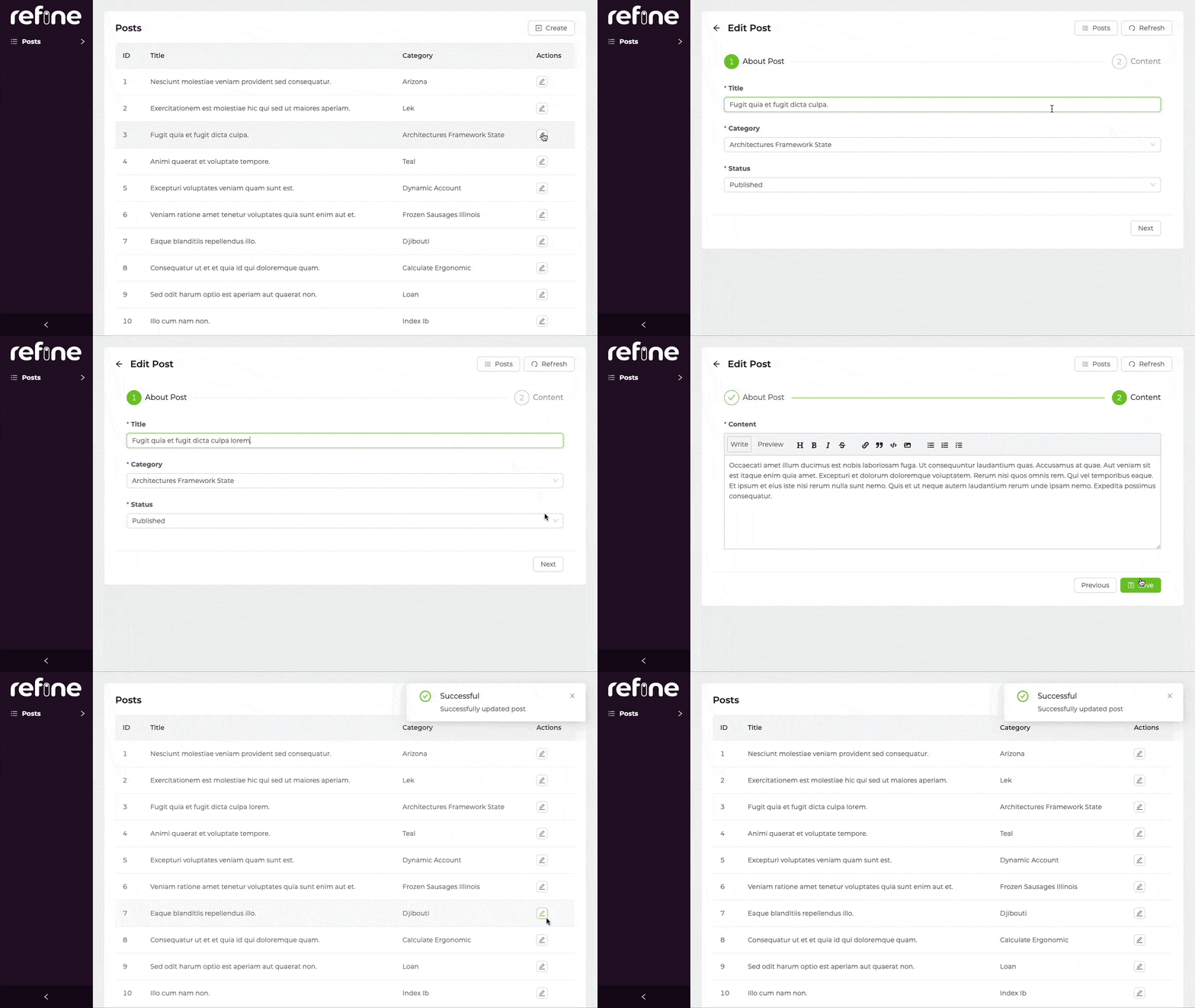
Edit
In this example, we'll just look at what's different from the example above.
import {
    useStepsForm,
    useSelect,
    Form,
    Input,
    Select,
    Steps,
    Button,
    SaveButton,
    Edit,
} from "@pankod/refine-antd";

export const PostCreate: React.FC = () => {
    const {
        current,
        gotoStep,
        stepsProps,
        formProps,
        saveButtonProps,
        queryResult,
        submit,
    } = useStepsForm<IPost>();

    const postData = queryResult?.data?.data;
    const { selectProps: categorySelectProps } = useSelect<ICategory>({
        resource: "categories",
        defaultValue: postData?.category.id,
    });

    const formList = [
        <>
            <Form.Item
                label="Title"
                name="title"
                rules={[
                    {
                        required: true,
                    },
                ]}
            >
                <Input />
            </Form.Item>
        </>,
        <>
            <Form.Item
                label="Category"
                name={["category", "id"]}
                rules={[
                    {
                        required: true,
                    },
                ]}
            >
                <Select {...categorySelectProps} />
            </Form.Item>
        </>,
    ];

    return (
        <Edit
            actionButtons={
                <>
                    {current > 0 && (
                        <Button
                            onClick={() => {
                                gotoStep(current - 1);
                            }}
                        >
                            Previous
                        </Button>
                    )}
                    {current < formList.length - 1 && (
                        <Button
                            onClick={() => {
                                gotoStep(current + 1);
                            }}
                        >
                            Next
                        </Button>
                    )}
                    {current === formList.length - 1 && (
                        <SaveButton
                            {...saveButtonProps}
                            style={{ marginRight: 10 }}
                            onClick={() => submit()}
                        />
                    )}
                </>
            }
        >
            <Steps {...stepsProps}>
                <Steps.Step title="First Step" />
                <Steps.Step title="Second Step" />
            </Steps>
            <Form {...formProps} layout="vertical">
                {formList[current]}
            </Form>
        </Edit>
    );
};
API Reference
Properties
*: These props have default values inRefineContextand can also be set on <Refine> component.useModalFormwill use what is passed to<Refine>as default but a local value will override it.
**: If not explicitly configured, default value ofredirectdepends on whichactionused. Ifactioniscreate,redirects default value isedit(created resources edit page). ifactioniseditinstead,redirects default value islist.
Return Values
| Key | Description | Type |
|---|---|---|
| stepsProps | Ant Design steps props | StepsProps |
| current | Current step, counting from 0. | number |
| gotoStep | Go to the target step | (step: number) => void |
| formProps | Ant Design form props | FormProps |
| form | Ant Design form instance | FormInstance<TVariables> |
| formLoading | Loading status of form | boolean |
| defaultFormValuesLoading | DefaultFormValues loading status of form | boolean |
| submit | Submit method, the parameter is the value of the form fields | () => void |
| saveButtonProps | Props for a submit button | { disabled: boolean; onClick: () => void; loading: boolean; } |
| queryResult | Result of the query of a record | QueryObserverResult<{ data: TData }> |
| mutationResult | Result of the mutation triggered by submitting the form | UseMutationResult<{ data: TData },TError, { resource: string; values: TVariables; }, unknown>](https://react-query.tanstack.com/reference/useMutation) |
| id | Record id for clone and create action | BaseKey |
| setId | id setter | Dispatch<SetStateAction< string | number | undefined>> |
Type Parameters
| Property | Desription | Default |
|---|---|---|
| TData | Result data of the query that extends BaseRecord | BaseRecord |
| TError | Custom error object that extends HttpError | HttpError |
| TVariables | Values for params. | {} |