Show
<Show> provides us a layout for displaying the page. It does not contain any logic but adds extra functionalities like a refresh button or giving title to the page.
We will show what <Show> does using properties with examples.
You can swizzle this component to customize it with the refine CLI
Properties
title
It allows adding a title for the <Show> component. if you don't pass title props it uses the "Show" prefix and the singular resource name by default. For example, for the "posts" resource, it will be "Show post".
resource
The <Show> component reads the resource information from the route by default. This default behavior will not work on custom pages. If you want to use the <Show> component in a custom page, you can use the resource property.
Refer to the custom pages documentation for detailed usage. →
canDelete and canEdit
canDelete and canEdit allows us to add the delete and edit buttons inside the <Show> component. If the resource has canDelete or canEdit property refine adds the buttons by default.
When clicked on, delete button executes the useDelete method provided by the dataProvider and the edit button redirects the user to the record edit page.
Refer to the <DeleteButton> and the <EditButton> documentation for detailed usage.
Refer to the usePermission documentation for detailed usage. →
recordItemId
<Show> component reads the id information from the route by default. recordItemId is used when it cannot read from the URL (when used on a custom page, modal or drawer).
<Show> component needs the id information for <RefreshButton> to work properly.
dataProviderName
If not specified, Refine will use the default data provider. If you have multiple data providers and want to use a different one, you can use the dataProviderName property.
import { Refine } from "@pankod/refine-core";
import { Show } from "@pankod/refine-antd";
import routerProvider from "@pankod/refine-react-router-v6";
import dataProvider from "@pankod/refine-simple-rest";

const PostShow = () => {
    return <Show dataProviderName="other">...</Show>;
};

export const App: React.FC = () => {
    return (
        <Refine
            routerProvider={routerProvider}
            dataProvider={{
                default: dataProvider("https://api.fake-rest.refine.dev/"),
                other: dataProvider("https://other-api.fake-rest.refine.dev/"),
            }}
            resources={[{ name: "posts", show: PostShow }]}
        />
    );
};
goBack
To customize the back button or to disable it, you can use the goBack property.
isLoading
Since <Show> uses the Ant Design <Card> component, the isLoading property can be set like the below.
breadcrumb
To customize or disable the breadcrumb, you can use the breadcrumb property. By default it uses the Breadcrumb component from @pankod/refine-antd package.
Refer to the Breadcrumb documentation for detailed usage. →
This feature can be managed globally via the <Refine> component's options
wrapperProps
If you want to customize the wrapper of the <Show/> component, you can use the wrapperProps property. For @pankod/refine-antd wrapper elements are simple <div/>s and wrapperProps can get every attribute that <div/> can get.
headerProps
If you want to customize the header of the <Show/> component, you can use the headerProps property.
Refer to the PageHeader documentation from Ant Design for detailed usage. →
contentProps
If you want to customize the content of the <Show/> component, you can use the contentProps property.
Refer to the Card documentation from Ant Design for detailed usage. →
headerButtons
You can customize the buttons at the header by using the headerButtons property. It accepts React.ReactNode or a render function ({ defaultButtons }) => React.ReactNode which you can use to keep the existing buttons and add your own.
headerButtonProps
You can customize the wrapper element of the buttons at the header by using the headerButtonProps property.
Refer to the Space documentation from Ant Design for detailed usage. →
footerButtons
You can customize the buttons at the footer by using the footerButtons property. It accepts React.ReactNode or a render function ({ defaultButtons }) => React.ReactNode which you can use to keep the existing buttons and add your own.
footerButtonProps
You can customize the wrapper element of the buttons at the footer by using the footerButtonProps property.
Refer to the Space documentation from Ant Design for detailed usage. →
actionButtons
actionButtonsUse headerButtons or footerButtons instead.
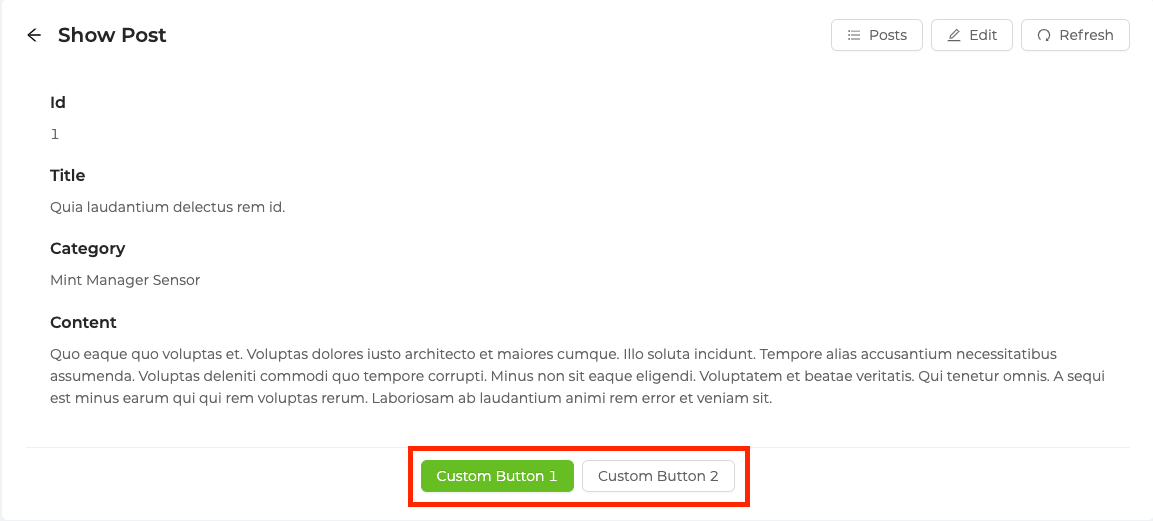
<Show> uses the Ant Design <Card> component so you can customize the action property with the properties of actionButtons. By default, the action property of the <Card> component shows nothing in the <Show> component.
import { Show, Space, Button } from "@pankod/refine-antd";

export const ShowPage: React.FC = () => {
    return (
        <Show
            actionButtons={
                <Space>
                    <Button type="primary">Custom Button 1</Button>
                    <Button type="default">Custom Button 2</Button>
                </Space>
            }
        >
            ...
        </Show>
    );
};
pageHeaderProps
pageHeaderPropsUse headerProps, wrapperProps or contentProps instead.
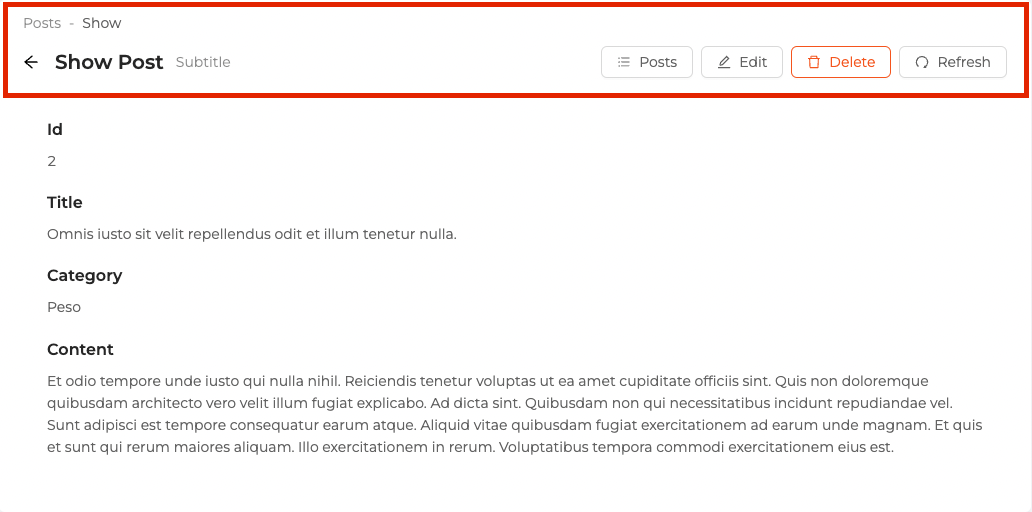
<Show> uses the Ant Design <PageHeader> components so you can customize it with the properties of pageHeaderProps.
By default, the extra property of the <PageHeader> component shows <RefreshButton>, <ListButton>, <EditButton> and <DeleteButton> based on your resource definition in the resources property you pass to <Refine> and the breadcrumb property shows <Breadcrumb> component.
import { Show } from "@pankod/refine-antd";

export const ShowPage: React.FC = () => {
    return (
        <Show
            pageHeaderProps={{
                onBack: () => console.log("Hello, refine"),
                subTitle: "Subtitle",
            }}
        >
            ...
        </Show>
    );
};
The <Show> component needs the id information for work properly, so if you use the <Show> component in custom pages, you should pass the recordItemId property.
API Reference
Properties
| Property | Description | Type | Default |
|---|---|---|---|
| title | Adds a title | React.ReactNode | "Show" prefix and singular of resource.name |
| resource | Resource name for API data interactions | string | Resource name that it reads from the URL. |
| canDelete | Adds a delete button | boolean | If the resource has canDelete prop it is true else false |
| canEdit | Adds an edit button | boolean | If the resource has canEdit prop it is true else false |
| recordItemId | The record id for <RefreshButton> | BaseKey | |
| dataProviderName | To specify a data provider other than default use this property | string | |
| goBack | Custom back icon element | React.ReactNode | <ArrowLeft /> |
| isLoading | Gets passed to the loading prop of the <Card> | boolean | false |
| breadcrumb | Custom breadcrumb element | React.ReactNode | <Breadcrumb/> |
| wrapperProps | Wrapper element props | React.DetailedHTMLProps<HTMLDivElement> | |
| headerProps | Header element props | PageHeaderProps | |
| contentProps | Content wrapper element props | CardProps | |
| headerButtons | Header buttons element or render function | ({ defaultButtons: React.ReactNode }) => React.ReactNode | React.ReactNode | |
| headerButtonProps | Header buttons wrapper element props | SpaceProps | |
| footerButtons | Footer buttons element or render function | ({ defaultButtons: React.ReactNode }) => React.ReactNode | React.ReactNode | |
| footerButtonProps | Footer buttons wrapper element props | SpaceProps | |
actionButtons deprecated | Gets passed to the extra prop of the <Card> | React.ReactNode | <SaveButton> and depending on your resource configuration (canDelete prop) |
pageHeaderProps deprecated | Passes props for <PageHeader> | PageHeaderProps | { ghost: false, title, extra: <ListButton> and <RefreshButton>, breadcrumb: Breadcrumb } |